
XNote vs reMarkable: Real Paper or a Paper Tablet?
One puts real ink on a real page; the other is a screen built to feel like paper. What each does after the last stroke, what it costs and which to buy.

On this page
One of these products comes with a notebook. The other does a very good impression of one. A smart pen and notebook like XNote Write captures real ink on a real page; a paper tablet like reMarkable Paper Pure is a screen built to feel like paper. You feel the difference three weeks after a meeting, when you need what Jordan promised and the meeting is one page in a full notebook.
Quick answer
XNote vs reMarkable: both turn handwriting into text for free; they split on ink versus a screen, and on whether finding old pages costs extra. Pick XNote Write ($199) to keep writing in ink on XNote paper, with your pages searchable in the XNote app and no subscription needed. Pick reMarkable Paper Pure (from $399) to erase, mark up PDFs, read EPUBs and carry one device; searching your handwriting needs Connect ($3.99 a month). Prices checked October 9, 2026.
We make XNote Write. Every reMarkable fact below comes from a linked source: reMarkable's own pages, plus one hands-on from The Verge, all checked October 9, 2026. Where reMarkable is the better buy, we say so.
XNote vs reMarkable: what's the actual difference?
XNote Write is a smart pen and notebook: you write with real ink on XNote paper and your handwriting appears in the XNote app, searchable and understood by AI. reMarkable Paper Pure is a paper tablet: a 10.3 inch E Ink screen (the low-power, paper-like display used in e-readers) you write on with a Marker, so the screen itself is the page.
The pen captures handwriting only on XNote paper: XNote notebooks, or pages you print from the XNote app on a laser printer. It reads a tiny pattern printed on those pages and sends every stroke to the app over Bluetooth. With the app open and connected, your handwriting appears as you write. No phone nearby? The pen stores up to 1,000 pages. Import them next time you open the app.
reMarkable's pitch is quiet. In its own words, Paper Pure "doesn't buzz, notify, or nudge, leaving you in peace with your ideas" (Paper Pure page). That's a fair dig at any setup that keeps a phone on the table, ours included: XNote Write sends your pages to the XNote app on your phone or tablet.
Is there a reMarkable alternative with real paper and no subscription?
Yes. If real paper means ink on a page, the reMarkable alternative is a smart pen and notebook: you write in real ink on the pen's own paper, and every stroke lands in an app. XNote Write is one, and it needs no subscription: handwriting-to-text and search come with the XNote app's Free plan.
Two other smart pens, the Neo Smartpen M1+ and the Moleskine Smart Writing Set, are picks in Wired's smart notebook and smart pen roundup (updated August 2026). Of the five "reMarkable alternative" lists we opened on October 9, 2026, four list only tablets; our smart notebook roundup puts paper and screens side by side.
If you're only avoiding the subscription, you may not need an alternative at all: a reMarkable turns handwriting into text for free. Handwriting search and the AI tools are what need Connect. Looking for a reMarkable 2 alternative because it was discontinued? Skip to the section for reMarkable 2 owners.
What can XNote Write and reMarkable do after you finish writing?
Without a subscription, XNote Write does more with a finished page: it searches your handwriting once pages sync, answers questions about your pages (AI chat is included, with usage limits) and turns to-dos into tasks. reMarkable does more on the page itself: erase, mark up PDFs, read, and work with no phone in reach. Add Connect and it searches your handwriting too.
Call it the after-the-last-stroke test: judge a note-taking tool by what it can do with a page once you stop writing. Spec sheets describe the writing. This test starts on day 21.
Here is that page, in ink and as text in the XNote app. Jordan is on three lines. The one you want says "Jordan will pull latest # signups".


Day 21: getting back to Jordan's line
- XNote Write. Type "Jordan" into the XNote app's search. It finds pages by any word you wrote once they sync, so page 32 is among the thumbnails. Or ask your pages what Jordan promised (AI chat is included, with usage limits).
- Paper Pure with Connect. Search your handwriting for "Jordan" (pricing table).
- Paper Pure, no Connect. Handwriting search needs Connect. You can convert the page to text for free, but reMarkable doesn't say whether that text is searchable without Connect. Otherwise, you find the notebook (free tags help) and flip pages.
Day 21 is one job. Here are nine, plus what each one has you rebuy. Without Connect, XNote Write does more with a finished page; reMarkable does more on the page itself.
| Job | XNote Write | Paper Pure |
|---|---|---|
| Search your notes for a word | YesOnce pages sync | With ConnectConverted text: not stated |
| Ask your notes a question | YesAI chat is included, with usage limits | NoConnect adds AI summaries; no Q&A chat listed |
| Turn handwriting into text | YesUnlimited handwriting-to-text | YesNo Connect needed |
| Turn to-dos into tasks and events | Yes | With ConnectAI next steps |
| Share a page | YesPDF, Word, Markdown or a link anyone can view | YesPDF, PNG or SVG by email; Screen Share |
| Erase and rewrite | NoInk is permanent; edit the converted text | Yes |
| Mark up a PDF | No | Yes |
| Read a book | No | PartlyEPUB and web articles; no reading light |
| Work with no phone nearby | PartlyThe pen stores up to 1,000 pages | YesThe tablet is the screen |
"With Connect" means only with a Connect subscription. Not stated: whether Connect's "Search the contents of handwritten and typed notes" is needed for text converted on the tablet. Connect also turns web articles into editable notebooks. Sources: XNote Write and XNote app pages; reMarkable's Paper Pure page, features, compare page and pricing table. Checked October 9, 2026.
XNote Write
Paper and ink
Free pages you print from the XNote app on your own laser printer, about 7 cents a page in paper and toner (printable pages). Or notebooks at $19 to $39. Ink refills are $12 for five.
reMarkable Paper Pure
Marker tips
Marker tips are $19, and 6 spares come in the box (Marker tips, Paper Pure FAQ). Prices checked October 9, 2026.
One catch on our side: handwriting-to-text and AI need an internet connection. A page written on a plane becomes searchable after it syncs.
Can XNote Write erase, mark up PDFs or read books?
No. XNote Write is a pen on paper, so the ink is permanent and there is no screen to open a PDF or a book on. If you need to erase, annotate or read, reMarkable Paper Pure is the better tool.
- Erasing and rearranging. You can "erase, move, and improve" notes with layers, shapes and highlights (Paper Pure page), and the selection tool can "copy, cut, paste, move, resize, rotate or flip" (features).
- PDFs. It imports PDF and EPUB files, exports PDF, PNG and SVG, and emails pages from the tablet (features).
- Reading. EPUB books work without Connect. Paper Pure has "No reading light" (compare page), so bedtime reading needs a lamp, like a paperback.
- One device. Every notebook lives in one slate, and there are no notebooks to rebuy.
XNote has no eraser. Cross it out on paper, then fix the typed version in the app.
Which reMarkable features need a Connect subscription?
A reMarkable needs Connect for handwriting search, AI tools such as Convert and share, the Meeting Notes Tool, writing and editing in reMarkable's phone and computer apps, and sending to Slack or Miro. Connect costs $3.99 a month or $39.90 a year (checked October 9, 2026). Turning handwriting into text on the tablet stays free.
Needs Connect
- Handwriting search
- Convert and share (AI summaries and next steps)
- Writing and editing in reMarkable's phone and computer apps
- Meeting Notes Tool
- Convert to Notebook
- Sending to Slack and Miro
- Cloud sync for every notebook
Free without Connect
- Turning handwriting into text on the tablet
- Google Drive, Dropbox and OneDrive
- Viewing your notes in reMarkable's apps
- Screen Share and sending pages by email
- Tags
- EPUB reading, including web articles
- Cloud sync for notebooks edited in the last 50 days
Both lists come from reMarkable's pricing table and its support page on using reMarkable without a subscription, checked October 9, 2026.
Some alternatives lists get this wrong. One from 2026 says reMarkable's Connect subscription "is required for cloud sync, handwriting-to-text conversion, and screen mirroring." All three are overstated. reMarkable's own pricing table lists Handwriting Conversion and Screen Share as included without Connect, and cloud sync as limited, not absent.
Its free tier is more generous than its reputation, with one real limit: without Connect, only notebooks edited in the last 50 days sync to reMarkable's cloud (pricing table).
Connect's fine print, in reMarkable's words
- Trial. "Anyone without an active subscription gets a 50-day free trial when pairing a device to their account." (Connect page)
- After you cancel. Your files stay, but unedited ones stop syncing to reMarkable's apps after 50 days, and writing in those apps ends (Connect FAQ). Our cost guide quotes the full terms in what happens if you cancel Connect.
If you rarely go back to old pages, skip Connect. If searching old pages is the point, $39.90 a year is what that habit costs on a reMarkable. Our 3-year cost comparison works out whether Connect is worth it for you.
On XNote Write, search and handwriting-to-text come with the Free XNote plan. AI chat is included, with usage limits. The Free plan also includes 150 audio minutes a month. Plans are optional and mainly for audio, and paid plans also raise the AI chat limits (what the Free XNote plan includes).
Which costs less over 3 years, XNote Write or reMarkable Paper Pure?
Print its pages yourself and XNote Write costs less over three years than reMarkable Paper Pure with Connect, up to about 6 handwritten pages a workday, if you already own a laser printer. At a notebook's worth of pages a quarter (about 15 a week), XNote Write ($199) with printed pages comes to about $350, against $518.70 for Paper Pure with Connect and $399 without it. Prices checked October 9, 2026; ink and Marker tips not counted.
$350
XNote Write, pages you print. Search included.
Estimate over 3 years: $307 to $408
$518.70
Paper Pure, Connect billed yearly. Search included.
3 years at list prices
$518
Alternative: XNote Write, a bought notebook a quarter.
3 years at list prices
$399
Paper Pure, no Connect. No handwriting search.
3 years at list prices
Pages you print from the XNote app are free. You pay only for your own paper and toner on a laser printer: about 7 cents a page (5 to 10 cents) at US prices we checked on October 9, 2026. Inkjet prints can't be read by the pen, and XNote's printable pages need a laser printer at 600 dpi or better. Depending on your toner and paper, the break-even with Paper Pure and Connect falls between 4.4 and 8.2 pages a workday. Paper is a running cost too; it just doesn't send a monthly bill.
| Setup | Day one | After day one | 3 years |
|---|---|---|---|
| XNote Write, pages you print | $199 | about 7 cents a pagePaper and toner | about $350$307 to $408 |
| Paper Pure, no Connect | $399 | Nothing | $399 |
| Paper Pure, free Connect year, then monthly | $399 | 24 x $3.99 | $494.76 |
| XNote Write, bought notebooksAlternative: a Standard notebook a quarter | $199 | 11 x $29One more comes in the box | $518 |
| Paper Pure, Connect billed yearly | $399 | 3 x $39.90 | $518.70 |
| XNote Write, print-shop pagesIf you have no laser printer | $199 | about 25 cents a pagePaper included | about $727$643 to $917 |
2,304 pages over 3 years. List prices checked October 9, 2026, with the $399 Paper Pure and Marker (bundles $449 to $549). Printed pages: paper and toner at 5 to 10 cents a page, after the notebook in the box. Print shop: black-and-white letter pages, 24 lb paper included, 21 to 34 cents a page online, before tax. Sources: XNote Write, printable pages, Standard notebook, Paper Pure, Connect, free Connect year.
The alternative: bought notebooks. A Standard notebook (192 pages) every quarter brings XNote Write to $518, within a dollar of Paper Pure with Connect billed yearly ($518.70). reMarkable's free Connect year tips that one to Paper Pure ($494.76), and skipping search makes Paper Pure $119 cheaper.
Now take three pages every workday, the daily writer in our breakdown of what 10 note-taking setups cost over 3 years. XNote Write then comes to about $353 with printed pages, or $547 with 12 bought notebooks.
No laser printer yet? The cheapest of five we checked that meets XNote's printing checklist costs $179.99. Count it, and printed XNote Write stays cheaper than Paper Pure with Connect up to about 2.7 pages a workday (2.1 to 3.7). Or print the app's pages at a print shop such as FedEx Office or Staples: black-and-white letter pages on 24 lb paper cost about 25 cents each (21 to 34 cents) at prices we checked on October 9, 2026.
A print shop is a convenience, not a saving. At a notebook's worth of pages a quarter, it brings XNote Write to about $343 in year one and about $727 over 3 years, against $286 and $518 with bought notebooks. That is also more than Paper Pure with Connect ($518.70): over 3 years, print-shop XNote Write costs more from about 1.9 pages a workday (1.5 to 2.2). Choose US Letter in the app, ask for actual size and laser output, and try one test page with the pen first (what to ask the print shop).
How we counted. XNote Write comes with a 192-page Standard notebook, so we count it first and print the other 2,112 pages; print every page instead and add about $14. Paper and toner prices are US list and store prices for a 24 lb ream and genuine toner, checked October 9, 2026. With bought notebooks, XNote Write stays under the $399 Paper Pure up to six notebooks plus the one in the box. That's 1,344 pages, about 8.6 a week ($199 + 6 x $29 = $373; a seventh makes $402).
About the free Connect year. It is reMarkable's current offer on new tablets bought on remarkable.com. Activate it "within 30 days of your purchase date"; it then renews monthly at the standard rate unless you cancel (offer terms; no end date published). Switch to yearly billing after it and that row drops to $478.80.
Not counted: ink refills ($12 for five), Marker tips ($19), tax and shipping. XNote publishes no estimate for how long a refill lasts. reMarkable's tip estimate ("anywhere between two and four months" of daily use) is for the Paper Pro, not the Paper Pure (Marker tips).
Which has the longer return window, XNote Write or reMarkable?
reMarkable has the longer return window: "free returns and a full refund within 50 days after your delivery date" (Paper Pure FAQ), against 30 days from receiving your order for XNote Write. reMarkable runs on fifties: 50 days to return the tablet, 50 days of Connect trial from the day you pair it, and 50 days after you cancel before unedited files stop syncing.
On XNote Write, you can write in the included notebook and still get a full refund, as long as you send the set back complete. Warranties are the same length: reMarkable lists a "1-year limited warranty" (shop listing), and the XNote pen has a 12-month warranty.
On XNote returns, original shipping fees may not be refunded. reMarkable's 2024 guarantee post says it sends a prepaid DHL courier to pick a return up (how its 50-day guarantee works).
The free Connect year adds a 30-day activation window of its own.
I have a reMarkable 2. Should I switch to Paper Pure or XNote Write?
If your reMarkable 2 still works, keep it: it is discontinued but still supported. Its product page says it "has been discontinued" and that "All our reMarkable 2 users will still receive regular software updates from our team" (checked October 9, 2026). reMarkable announced the change on May 6, 2026, the day it introduced Paper Pure.
Paper Pure starts at $399, and reMarkable's announcement said it would begin shipping in early June. The Verge's hands-on lists better contrast, a better processor, 2 GB of RAM instead of 1 GB and 32 GB of storage instead of 8 GB. Your old Marker stays behind: "Markers for reMarkable 2 can't be used with reMarkable Paper Pure, reMarkable Paper Pro, or reMarkable Paper Pro Move" (Paper Pure FAQ). Paper Pure comes with its own Marker.
If what you miss is paper, XNote Write can sit beside the tablet instead of replacing it: PDFs on the reMarkable, meetings and journals in ink.
Discontinued is a status, not a diagnosis. Your tablet does tomorrow what it did yesterday.
XNote Write, reMarkable or something else: which should you buy?
Buy XNote Write if you write in ink and want to search and ask your pages later. Buy reMarkable Paper Pure to erase, mark up PDFs or carry one quiet device; Connect is optional. If reading comes first, look at Kindle Scribe. Amazon's newest model has an 11 inch display with a front light, and you can "jot notes right on the page" of Kindle books (Amazon, checked October 9, 2026). And if you already own an iPad, spend a week with a note app and an Apple Pencil that fits your iPad before buying a second device.
XNote Write is the wrong buy if you:
- need to erase and rewrite, mark up PDFs or read books on the same device;
- want to keep writing in notebooks you already own (only XNote paper syncs);
- would fill a notebook a quarter, have no laser printer and rarely search old pages (over 3 years, a Paper Pure with no Connect costs $119 less than XNote Write with bought notebooks);
- want the pen to record audio (it has no microphone);
- rarely write by hand (a phone photo of the odd page costs nothing).
Our XNote review covers the pen's other limits.
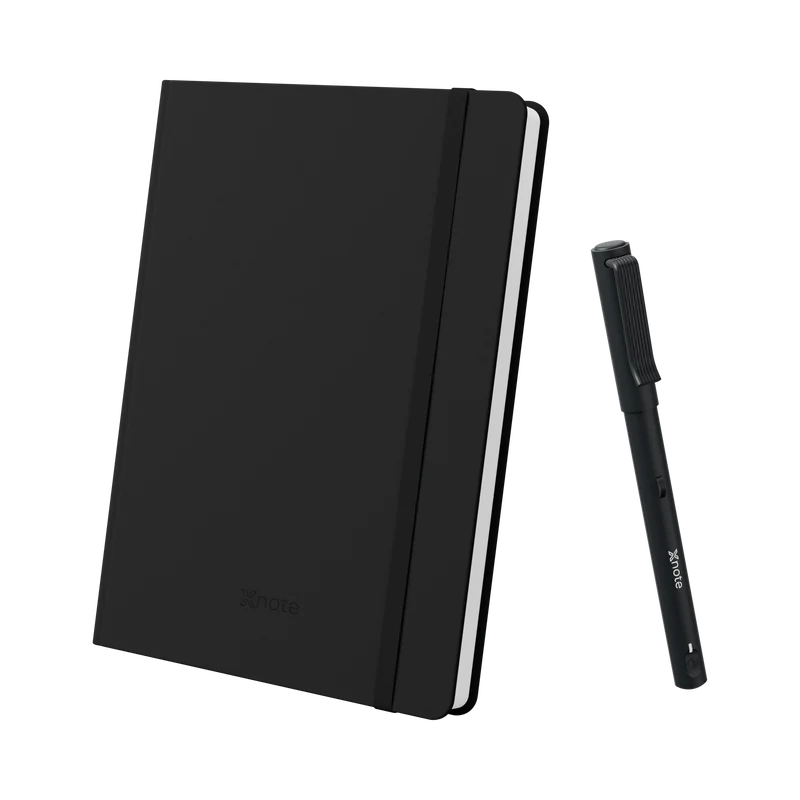
XNote Write
Real ink on XNote paper, with your pages searchable and understood by AI in the XNote app. $199, no subscription needed (price checked October 9, 2026). 30-day returns.
The pen captures handwriting only on XNote paper.
See XNote WriteXNote vs reMarkable: common questions
Does XNote Write work on any paper?
No. The pen captures handwriting only on XNote paper: XNote notebooks, or pages you print free from the XNote app on a laser printer, on US Letter or A4. On ordinary paper, it's just a pen. A reMarkable needs no paper at all, only its screen. XNote's printable pages page lists the layouts you can print.
Can XNote Write record a meeting?
Not with the pen. The XNote Write pen has no microphone: it captures what you write. To record a meeting, use the XNote app on your phone or send its meeting recorder to a Zoom, Google Meet or Microsoft Teams meeting; the app can't record phone calls. Recording laws differ by state and country. Tell everyone on the call that you're recording, and get their consent where the law requires it. This is general information, not legal advice.
Does reMarkable turn handwriting into text without Connect?
Yes. reMarkable's pricing table lists Handwriting Conversion ("Turn handwritten notes into typed text.") as included with no subscription, and its features page says conversion supports over 30 languages. Conversion runs on the tablet; converting inside reMarkable's apps is a Connect feature (reMarkable, 2024). Handwriting search, writing in reMarkable's phone and computer apps, and AI tools such as Convert and share are what need Connect. Checked October 9, 2026.
Does reMarkable have AI?
Yes, with Connect. reMarkable's pricing table lists Convert and share ("AI summarizes your notes and highlights into clear next steps") as a Connect feature, checked October 9, 2026. Handwriting conversion is free. On XNote Write, AI chat is included, with usage limits: ask a question and get the answer from your own pages.
Is a reMarkable better than a paper notebook?
For erasing, PDFs and carrying every notebook in one slate, yes. For a page that never needs charging, no. A paper notebook can't be searched. A Paper Pure (from $399) turns handwriting into text for free and searches it with Connect. A smart pen and notebook such as XNote Write sits between them: real ink on XNote paper, with your pages searchable in the XNote app once they sync. Prices checked October 9, 2026.
Can I use both XNote Write and a reMarkable?
Yes. Split the jobs: PDFs, reading and drafts you'll erase on the reMarkable; meeting notes and journals in ink with XNote Write, where you can search and ask your pages later. Each keeps its own library: XNote pages in the XNote app, reMarkable notebooks in reMarkable's apps and cloud.
Which is better for meetings, XNote or reMarkable?
For meetings where you write by hand and act on the notes afterward, XNote Write fits. To-dos and dates you write become tasks and calendar events, and you can ask your pages who promised what (AI chat is included, with usage limits). Sending tasks on to your own calendar and task apps takes setup. If you mark up slides or a PDF agenda, a reMarkable is the better tool; its Meeting Notes Tool (prefilled notes from your calendar) needs Connect.
Sources and method
On October 9, 2026 we read the reMarkable and XNote pages listed below, plus two press pieces. We did not test the two side by side, so this post makes no claims about writing feel, speed or handwriting recognition. We make XNote Write. Our compare page has the short version.
- reMarkable: store; Paper Pure and FAQ; features; compare; shop listing; Connect; Connect pricing; one-year offer terms; Marker tips; reMarkable 2; 50-day satisfaction guarantee; Paper Pure announcement; 2024 release on conversion in the apps; using reMarkable without a subscription.
- XNote: XNote Write; Standard notebook; ink refills; XNote app and plans; returns and warranty.
- Print-shop pages, online orders for store pickup, checked October 9, 2026, before tax: black and white, letter, single-sided, 24 lb paper included. FedEx Office $0.24 a page (1 to 499 pages), Office Depot $0.25 (1 to 249) and Staples $0.34 (1 to 99). Typical is the middle price, 25 cents. No shop states its printer type or resolution, so test one page first.
- Other picks and press: Kindle Scribe on Amazon; Apple Pencil compatibility; The Verge, Paper Pure hands-on; Wired, smart notebooks and pens; Penstar, the alternatives list quoted in the Connect section.
Last updated October 2026. Prices and the Connect offer checked October 9, 2026.