
Rocketbook Alternatives: What Changed and What to Use Now
Rocketbook is still sold, but your scans may live on one phone. Save them first, then pick the alternative that fits how you used yours.

On this page
Rocketbook is still on sale under a new owner, and its free app got an update on October 7, 2026. The quieter problem is on your phone. Reinstall the Rocketbook app, or log out and back in, and My Scans starts empty: Rocketbook keeps your scan history on the phone, not in a Rocketbook cloud. Save your scans first (steps below), then decide whether you need a Rocketbook alternative at all.
Quick answer
You may not need a Rocketbook alternative: Rocketbook is still sold, under a new owner. First, send your scans to a cloud folder you control, because the app keeps them only on your phone. Then pick by job. Keep your Rocketbook to wipe and reuse pages. Use your phone's free scanner for a few pages a week. If scanning is the chore, get a smart pen that captures pages as you write on its own paper.
Is Rocketbook going out of business?
As of October 2026, Rocketbook is not going out of business; it changed owners. BIC announced on December 4, 2025 that it would wind Rocketbook down. Global Printing & Packaging then acquired the brand (announced March 10, 2026). The notebooks are still on sale (checked October 9, 2026).
If you heard it was over, you heard it from good sources. BIC's own headline reads "BIC discontinues Rocketbook and its Skin Creative Activities." A Reddit thread titled "Rocketbook is Discontinued" was the top Brave Search result for this question on October 9, 2026. Rocketbook's January explainer now returns a 404 error. The headline was accurate. It just stopped before the story did.
How do you save your Rocketbook notes before you switch?
To save your Rocketbook notes, resend every scan in the app's My Scans list to a cloud folder or email address you control, then check that the files arrived. Rocketbook's help center says scans are "not stored in a Rocketbook cloud account or automatically synced between devices." A new phone, a reinstall or a log-out starts you with an empty list.
Take the page you wrote on Tuesday. Before a damp towel touches it, check where its scan went. If the answer is "My Scans," your only digital copy is on one phone.
Rocketbook's own steps, with the version 4.0 menu names. We took them from its help center and January update and haven't tapped through them ourselves, so check each screen as you go:
- Check where each symbol sends. Open More > Symbol Presets, tap a symbol, then Destination. Point each symbol you use at a folder or inbox you control: Google Drive, Dropbox, OneDrive or email.
- Pick PDF. In the preset's Advanced Settings, set File Type to PDF. Bundle Scans keeps a multi-page note in one file (Auto-Send must be off).
- Resend everything. On iPhone: My Scans > More Actions > Select > Select All > Share or Resend. Rocketbook's January path for Android (archived copy): Scans > More Actions > Select > choose the scans > Share.
- Keep text for pages you search. Open a scan, tap Transcribe (labelled beta) and copy the text, or turn on "OCR Transcription: Send transcription to destination" in a preset.
- Check the folder before you delete anything. Scans you sent stay "safe and accessible," Rocketbook says; deleted scans "may not be recoverable through Rocketbook."
- Keep the notebook. Its pages still "write, erase, and reuse" without the app.
What happened to Rocketbook after BIC?
After BIC, Rocketbook went to the company that already made its products. Global Printing & Packaging (GPP), of Marlborough, Massachusetts, was "the exclusive original equipment manufacturer for Rocketbook products," according to Cambridge Savings Bank, which financed the deal. BIC had agreed to buy Rocketbook on November 9, 2020, for $40 million upfront plus a later payment tied to Rocketbook's performance.
Is the Rocketbook app going away?
The Rocketbook app is not going away as of October 2026. It got four updates in 2026: 3.6.4 on February 25, 3.6.5 on April 24, 4.0 on August 4 and 4.0.1 on October 7. Rocketbook's About page says "All Rocketbook products and the Rocketbook app remain fully supported."
Two promises are on record. Rocketbook's January 5, 2026 update said BIC would "support the app for at least one year after BIC's exit from the business." That post has since been removed; we cite an archived copy. The lender's release says the deal lets GPP "support the underlying Rocketbook mobile application." Neither is an end date: BIC's sets a floor of one year after its exit, and the lender's names no date at all.
The App Store and Google Play now list the developer as General Printing & Design, Inc. Version 4.0 also renamed History to My Scans and Destinations to Symbol Presets, so if you can't find History, you are not losing your mind.
Is Rocketbook still worth it, or should you switch?
Rocketbook is still worth it if you want pages you can wipe and reuse and only scan the ones that matter. Apart from a free phone scan, it is the cheapest system here: the Rocketbook Mini is $19.99 and the Core starts at $34.99 (Executive; Letter is $38.99), prices checked October 9, 2026.
Some owners even like the chore. One wrote (5 stars, August 2021): "when i'm done with all the pages, it forces me to erase them. Thus, i have to review all my notes and scan before cleaning off the pages." Few notebooks make you do your homework.
Good
- Pages wipe clean "with a bit of water and a towel."
- No charging: "either a Pilot FriXion or BIC Illusion erasable gel pen." A FriXion 3-pack is $9.
Not so good
- "If you're left handed, good luck. Most of my writing smears immediately as my hand touches the page." (2 stars, September 2021)
- "Taking a photo of every page became time-consuming and more work than I was looking for." (1 star, July 2023)
- "after a few wipes the ability to write on pages becomes significantly reduced." (3 stars, November 2025)
- Handwriting-to-text is labelled beta and "optimized for English."
Before you buy a clearance notebook
Items in the "Final Few (Final Sale)" collection are final sale, and Rocketbook's FAQ says those items "cannot be returned." The Next Gen Core, Flip, Mini and Multi Subject are regular items (checked October 9, 2026).
Notebooks like Rocketbook
Other brands make wipe-clean notebooks too. econotes, a French brand, sells its Reusable A5 notebook the Original for 34.90 euros with a black erasable pen (checked October 9, 2026). Its store lists the UK, Canada and the US (we didn't check shipping).
To try the system for nothing, Rocketbook offers free printable PDF pages for anyone "with a printer and smartphone." They are printouts, so you can scan them but not wipe them.
What is the best Rocketbook alternative?
If you liked wiping pages clean, the best Rocketbook alternative is the Rocketbook you already own (a new Mini is $19.99). For a few pages a week in a folder, use your phone's free scanner, such as Apple Notes or the OneDrive app. If scanning every page was the chore, a paper smart pen captures pages as you write on its own paper: Neo smartpen from $59, inq at $165 or XNote Write at $199. To erase on screen or mark up PDFs, get a reMarkable Paper Pure (from $399) or an iPad. Prices checked October 9, 2026.
| Option | To start | Nothing to scan | Wipe and reuse | Text and search |
|---|---|---|---|---|
| Your Rocketbook | $19.99Mini; Core from $34.99 | No | Yes | PartlyText in beta; search on one phone |
| Phone scan | $0With your phone | No | No | Depends on the app |
| Neo smartpen | $59dimo; A1 $139 | YesOn Neo's paper | No | YesOn the A1; others not checked |
| inq | $165 | YesOn inq paper | No | Yes |
| XNote Write | $199Phone not included | YesOn XNote paper | No | YesNeeds internet |
| reMarkable Paper Pure | $399 | Yes | YesOn screen | PartlySearch needs Connect |
| iPad (A16) + Apple Pencil | $449Plus $79 for the Pencil | Yes | YesOn screen | Depends on the app |
US list prices, checked October 9, 2026, from Rocketbook Mini, Core, Neo, inq, XNote Write, reMarkable, iPad and Apple Pencil. Every smart pen and screen here needs charging; Rocketbook and a phone scan add nothing new to charge.
A free scanner app on your phone
A scanner app on your phone is the cheapest Rocketbook alternative: $0 with a phone you own. On iPhone and iPad, Apple Notes has Scan Documents: open a note and tap the Attachment button. On Android, the Google Drive app scans too: tap Camera, then save the pages to a Drive folder as a PDF or JPG.
Here is the twist: the app that actually shut down this year was not Rocketbook's. Microsoft Lens stopped making new scans after March 9, 2026. Microsoft now points people to the OneDrive app, which "does not support saving scans locally on your device."
Want to keep the notebook and drop the Rocketbook app? Rocketbook itself named Adobe Scan, Genius Scan, CamScanner and iScanner as scanning apps that work with its pages, in its January update (archived copy). If the Rocketbook app ever goes, any of them is your Rocketbook alternative app.
A paper smart pen
A paper smart pen captures your strokes as you write on its maker's paper, so there is nothing to scan afterward. Pick Rocketbook for wipe-clean pages and a $19.99 start; pick a smart pen if photographing every page is the part you hate. The trade: the ink is permanent, the pen needs charging, and pages you already wrote are out of its reach.
Each pen reads a tiny pattern printed on its maker's paper (see how smart pen paper tells the pen where it is). By price:
- Neo smartpen: $59 for the dimo model; the A1, which searches your handwriting, is $139.
- Ophaya: from $69.95 with a mini notebook (price only; we did not score it).
- inq: $165 for the writing set, with standard D1 refills and a 100-day trial.
- XNote Write: $199. We make it; details below.
A paper tablet or an iPad
A paper tablet or an iPad swaps the wipe-clean page for a screen you erase, and it can mark up PDFs. The reMarkable Paper Pure starts at $399. Handwriting conversion needs no subscription; handwriting search and AI tools are part of Connect, $3.99 a month after a 50-day free trial. An iPad (A16) starts at $449, plus $79 for an Apple Pencil (USB-C); what it does with handwriting depends on your note app.
Rocketbook or reMarkable? A $19.99 notebook and a damp towel, or a $399 screen that also marks up your PDFs. For a paper smart pen against that screen, job by job, see XNote Write vs reMarkable. More devices are in our wider smart notebook roundup.
What should you check before you buy any Rocketbook alternative?
Run the stranded-owner test: five questions that show how much of a notebook system you keep if its maker changes hands, stops selling paper or stops updating its app. Ask them before you buy any Rocketbook alternative, ours included.
- What still works if the app goes away? Red flag: nothing works without the app.
- Can you export everything in open formats? Red flag: pages leave only as pictures.
- Can you get paper without the maker's store? Red flag: paper sold in one place only.
- Are the refills a standard size? Red flag: a refill only one company makes.
- Who supports the app today, and since when? Red flag: no name you recognize and no recent update.
Livescribe owners have already lived this. One wrote on Trustpilot (2 stars, May 2023): "Their paper is like ink is to a printer. No paper, your pen is worthless." Livescribe's US store now shows the Echo 2 and the LivePen A5 Bundle as sold out. Livescribe also said it would "stop adding new features to LivePen no later than August 31, 2025." It pointed owners to inq, whose app works with "all LivePen pens and notebooks."
If the app vanished tomorrow, what would be left of Tuesday's page? Here is each paper option, scored (reMarkable and the iPad use no paper, so they sit this one out).
| Option | 1. App gone | 2. Export | 3. Paper | 4. Refills | 5. App support |
|---|---|---|---|---|---|
| Rocketbook | YesOther scanner apps | YesPDF, JPG | YesFree printable PDFs | YesFriXion | Oct 7, 2026General Printing & Design |
| Phone scan | YesSwitch apps | YesPDF; varies by app | YesAny notebook | YesAny pen | Built inApple Notes; OneDrive updated Sep 28, 2026 |
| Neo smartpen | PartlyCapture needs the app | YesPDF; text on A1 | PartlyColor laser prints | PartlyD1 on some models | Aug 27, 2026NeoLAB; app since 2024 |
| inq | PartlyCapture needs the app | YesText, LaTeX, CSV | Partlyinq or LivePen notebooks | YesD1 | Oct 8, 2026inq; app since 2025 |
| XNote Write | PartlyCapture needs the app | YesPDF, Word, Markdown | PartlyFree laser prints or XNote notebooks | YesD1 | Oct 8, 2026XNote, Inc.; app since 2024 |
Scored October 9, 2026, from each maker's pages. Question 5: last app update, developer, first year on the App Store. Neo's rules for printing its paper: Neo printables page.
Rocketbook and a phone scan keep the most if an app goes away. XNote Write scores Partly twice, on capture and on paper (see how XNote's printable pages work). No maker can promise its own future, us included; this test scores only what you would keep today.
Where does XNote Write fit for Rocketbook owners?
XNote Write fits Rocketbook owners whose chore was scanning, not wiping. With the XNote app open and connected, each page appears in the app as you write, so there is nothing to scan.
Since we sell it, start with what it can't do. The ink is permanent, so pages can't be wiped and reused. The pen needs charging (up to 17 hours of continuous use per charge), and it has no microphone. The phone is not included. Owners' own complaints, word for word, are in our XNote review.
The pen captures handwriting only on XNote paper: free pages you print from the XNote app (with internet) on US Letter or A4, or XNote notebooks. On your own laser printer you pay only for paper and toner. No laser printer? A print shop such as FedEx Office or Staples can print them for a per-page fee: ask for laser output and try one test page with the pen first (what a print shop costs).
The upside: XNote Write is a smart pen and notebook: you write with real ink on XNote paper and your handwriting appears in the XNote app, searchable and understood by AI.
- Phone in another room? The pen stores up to 1,000 pages, and you import them next time you open the app.
- Unlimited handwriting-to-text, and you can edit any converted text in the app. Handwriting-to-text and AI need an internet connection.
- Find any page by a word you wrote (once it has synced), then send it as PDF, Word or Markdown, or share a link.
No subscription needed for XNote Write. AI chat is included, with usage limits. It costs $199 (checked October 9, 2026), with 30-day returns. You can try the pen and write in the notebook; send the complete set back for a full refund.
XNote Write is not for you if
- You want pages you can wipe and reuse: keep your Rocketbook.
- You want to digitize notebooks you already filled: the pen can't capture them, so use your phone's scanner.
- You only have an inkjet printer and want neither notebooks nor print-shop pages: inkjet prints can't be read by the pen.
With XNote Write, Tuesday's page skips the towel and the scan.
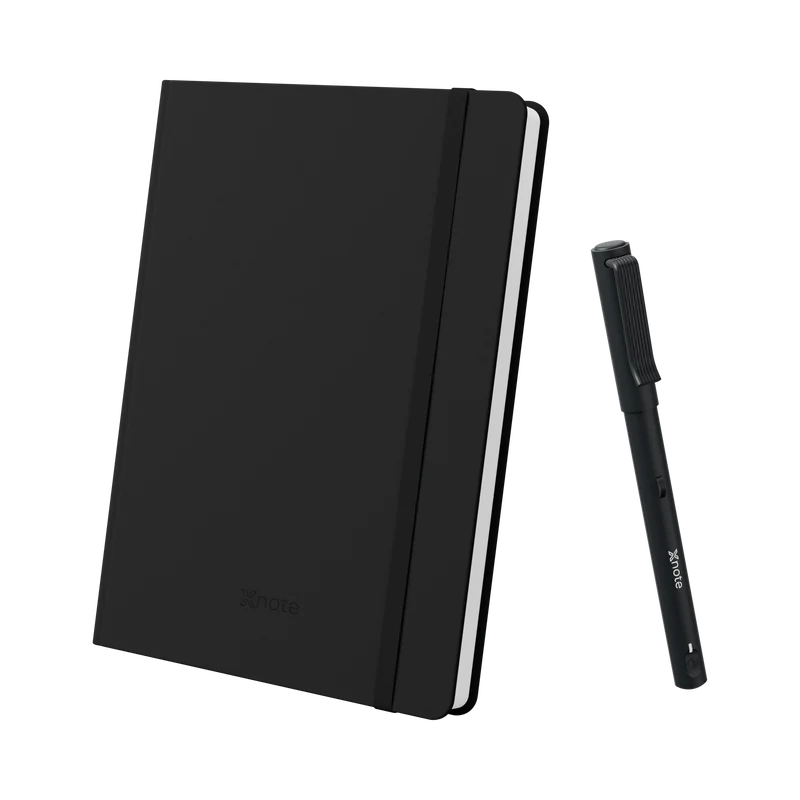
XNote Write
No scanning step: write in ink on XNote paper, and each page appears in the XNote app as you write.
Requires the XNote app, open and connected. Phone not included.
See XNote WriteRocketbook questions, answered
Does Rocketbook require a subscription?
Rocketbook does not list a subscription. Its app is free on the App Store, with no in-app purchases shown on the listing (checked October 9, 2026). Your running costs are erasable pens and any new notebooks. To compare, see what each notebook system costs over three years.
Can you still buy Rocketbook in the UK?
Not from Rocketbook's own store. Its FAQ says orders from GetRocketbook.com "can currently only be shipped within the contiguous United States (lower 48 states)," and it recommends your local Amazon store everywhere else. We did not check Amazon stock in the UK or any other country (checked October 9, 2026).
Can I scan Rocketbook pages without the Rocketbook app?
Yes. Rocketbook's January 2026 update (archived copy) names iOS Preview, Adobe Scan, Genius Scan, CamScanner and iScanner among the scanning apps that work, and the pages still "write, erase, and reuse" without the app. On an iPhone or iPad, the Notes app also has a built-in Scan Documents option.
Do Rocketbook pens work in other notebooks?
Yes. Rocketbook's pens are ordinary Pilot FriXion or BIC Illusion erasable gel pens, and they write in other notebooks too. Its FAQ says "you can use ANY Frixion pen, marker" in a Rocketbook, and FriXion is Pilot's own erasable range. The reverse needs care: Rocketbook says its notebooks "must be used with compatible erasable gel pens to ensure reusability."
Can XNote Write capture pages I already wrote in a Rocketbook?
No. XNote Write captures handwriting only as you write on XNote paper, with the XNote app open and connected, or it stores the pages in the pen for you to import later. Pages already written in a Rocketbook or any other notebook are out of its reach; save those with Rocketbook's app or a phone scanner.
Is XNote paper reusable?
No. The pen writes in permanent ballpoint ink, so pages can't be wiped, but you can edit the converted text in the app. New paper can be free pages you print from the XNote app on a laser printer, so you pay only for your own paper and toner. Or buy XNote notebooks (the Standard notebook is $29, checked October 9, 2026).
Sources and method
We read every source below on October 9, 2026, including an archived copy of Rocketbook's removed January update. We did not buy or test a Rocketbook. We scored only options whose makers' pages we read; econotes and Ophaya were checked for price only. Owner quotes are reviews on Rocketbook's own product pages and one Trustpilot review, quoted as written. Reddit blocked our reader, so we cite its thread by title and search rank only.
- Ownership and status: BIC, December 4, 2025; BIC, November 9, 2020; Cambridge Savings Bank, March 10, 2026 (we found no release from GPP itself); Rocketbook About page; Rocketbook's January 5, 2026 update (since removed; archived copy); Rocketbook store and FAQ.
- Rocketbook app: App Store; Google Play; help center articles on My Scans, new phones, Symbol Presets, handwriting recognition, Smart Search and version 4.0.
- Other makers: each maker's own page, linked where it is used above. App versions and release dates come from Apple's public App Store lookup.
Status rechecked October 9, 2026: still sold; Rocketbook app 4.0.1 (October 7, 2026).
Last updated October 2026. Prices checked October 9, 2026.